Posts

Showing posts with the label Wordpress

How to easily add www. in your Wordpress Website
Image
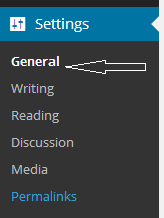
WordPress is used by millons of website across the world. But few are able to utilize its inbuilt functions. If you install WordPress manually on the server then by default your website URL (uniform resource locator) will be something like this e.g http://yourdomainname.com ,many people don't want to add www. in their domain name as prefix, but for those who want there is a simple way to add www. as a prefix in your domain name. Just login to your WordPress admin panel  Just Go to Setting Option Then Go to General Now In Wordpress Address (URL) and Site address (URL) , Just write www. after http:// See the ScreenShot and save the changes. That's it Now logout from your admin panel and again login and see changes , Now if you open http://yourdomain.com  it will redirect you to http://www.yourdomain.com Final Word : If you like our article then share this in your circle

How to install Wordpress on localhost and on the web server

Image
We are going to learn how to install Wordpress on localhost and on the web server. But before that lets discuss a brief introduction about wordpress We all know that wordpress is used by millions in the world, wordpress is powerful and dynamic CMS (Content management system) software. WordPress is the most popular self-hosted blogging software in use today.It is available as an open source project, licensed under the GPL, and is built largely on top of the MySQL database and PHP programming language. Any server environment that supports that simple combination can run WordPress, making it remarkably portable as well as simple to install and operate. You don’t need to be a systems administrator, developer, HTML expert, or design aesthete to use WordPress. On the other hand, because WordPress has been developed using a powerful set of Internet standard platforms, it can be used for the varities of application. Advantage of wordpress:  Using wordpress you can create dyna...