Posts

Showing posts with the label Tech News

Moto E Price specification and review on Flipkart

Image
After the huge success of Moto G and Moto x lunches on Flipkart. Motorola in exclusive association with Flipkart is lunching its newest affordable and best "priced for all" smartphone, the much awaited MOTO E . The global launch of this phone is being done in India and is available for sale only on Flipkart.com and nowhere else. Moto E is a affordable dual-SIM budget smartphone and this will be available at an awesome price of Just Rs 6,999 only. Key features and specification of Moto E :- Android 4.4 ( Kitkat OS ) Dual Standby SIM (GSM + GSM) 5 MP Primary Camera Wi-Fi  FM Radio 1.2 GHz MSM8x10 Dual Core Processor 4.3-inch Touchscreen Type Li-Ion, 1980 mAh GENERAL FEATURES In the Box Handset with Built-in Battery, Charger, Headset, QSG and Warranty Card Brand         Motorola Model ID  XT1022 Form         Bar SIM Size         Micro SIM SIM Type  ...

Some interesting and unknown facts about facebook.

Image
As we know facebook is most famous and largest social media network today. here are some facts that are interesting to some, unknown by most and will definetely increase the knowledge about the world's larget social media

How to crate an invisible folder ?

Image
Some time people don't want to share there secret and inportant files with others, Here today i am going to show you  how you can create an invisible folder in your windows operating system using a small trick This is very funny and interresting trick you can apply and show to friends that How talented and genious you are Process to create an invisible folder: Step 1 : Create a new folder Normally people create a new folder by Right Click->New->Folder But here you will get a new trick to create a new folder Just press Ctrl + Shift + N  , a new folder will be created Step 2 : Naming Of new folder When you will create a new folder it will ask you to give a name to the folder, Now By Pressing Alt Button just type +255 and release the Alt button, you will see a folder without a name has been created, Normally it is not possible to cteate a folder without any name Step 3 : Make your folder invisible: In this step we are going to change the icon ...

Now use MS Office to Create PDF File and XPS File .

Image
A good news is that now you can create a PDF  File just by using your MS Office  ( Word , Excel ,Powerpoint , Access and so on..) Microsoft has just released a Add-In for MS Office . PDF is used for security purpode and it it is also used to create ebooks . Distributing files in PDF format is also safer as you can avoid people changing the contents of the files further This download allows you to export and save to the PDF and XPS formats in eight 2007 Microsoft Office programs. It also allows you to send as e-mail attachment in the PDF and XPS formats in a subset of these programs. System requirements Supported Operating Systems: Windows Server 2003, Windows Vista, Windows XP Service Pack 2 or Window 7 This download works with the following Office programs: Microsoft Office Access 2007 Microsoft Office Excel 2007 Microsoft Office InfoPath 2007 Microsoft Office OneNote 2007 Microsoft Office PowerPoint 2007 Microsoft Office Publisher 2007 Microsoft Office Vis...

How to use google doc to create a contact form?

Image
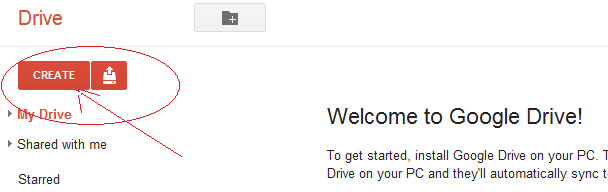
Google is known for its simplicity ,functionality and latest technology .Google is a giant search engine and apart from the search engine google also provides lots of the free applications and facilities some of the great and most usefuls are gmail,google map, you tube, gtalk, google+,blogger.com, feedburner, google adsense, google webmaster , google analytics, google doçs( documents ) and so on , Now a doy most of the company's whether it is a big or small there official works done online and Google docs plays a vital role for creating , manipulating ,and saving documents on line , So today we are going to learn how to use google doçs to make an attractive good looking contact form for any website or blog without writing any coding. Step 1:- Go to google docoments  sign in with your google account , if you don't have crate one Now , go to create as given below in the figure Step 2:- Here you can create any file  (e.g. Document , Presentation, spreadsheet ,...