Posts

How to create and publish an Email Newsletter for your website or Blog ?

Image
What is an Email Newsletter ? Email newsletter plays very important role for success of any website or blog , With email newsletter you can create more subscriber and reader for your blog This will give you more controll for message you sent to your subscribers, e.g you can easily create a auto responder for your subscriber,When you post anything on your blog then the post autometically sent to the subscribers email address this is the most useful way to engaged with your subscriber, You can also create your weekly newsletter using specific time interval Create an Email Newsletter There are so many software available to create Email newsletter such as feedburner , Aweber, Mailchimp and so on , with paid and free options out of this feedburner is the most useful and free options, This application is owned by google , If you want to get the most of your RSS feed then you should sign-up for a feedburner acccount. it is available completely free of cost bundeled with the lo...

Now use MS Office to Create PDF File and XPS File .

Image
A good news is that now you can create a PDF  File just by using your MS Office  ( Word , Excel ,Powerpoint , Access and so on..) Microsoft has just released a Add-In for MS Office . PDF is used for security purpode and it it is also used to create ebooks . Distributing files in PDF format is also safer as you can avoid people changing the contents of the files further This download allows you to export and save to the PDF and XPS formats in eight 2007 Microsoft Office programs. It also allows you to send as e-mail attachment in the PDF and XPS formats in a subset of these programs. System requirements Supported Operating Systems: Windows Server 2003, Windows Vista, Windows XP Service Pack 2 or Window 7 This download works with the following Office programs: Microsoft Office Access 2007 Microsoft Office Excel 2007 Microsoft Office InfoPath 2007 Microsoft Office OneNote 2007 Microsoft Office PowerPoint 2007 Microsoft Office Publisher 2007 Microsoft Office Vis...

How to use google doc to create a contact form?

Image
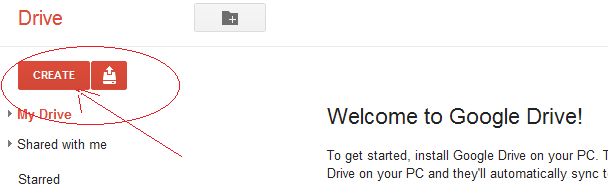
Google is known for its simplicity ,functionality and latest technology .Google is a giant search engine and apart from the search engine google also provides lots of the free applications and facilities some of the great and most usefuls are gmail,google map, you tube, gtalk, google+,blogger.com, feedburner, google adsense, google webmaster , google analytics, google doçs( documents ) and so on , Now a doy most of the company's whether it is a big or small there official works done online and Google docs plays a vital role for creating , manipulating ,and saving documents on line , So today we are going to learn how to use google doçs to make an attractive good looking contact form for any website or blog without writing any coding. Step 1:- Go to google docoments  sign in with your google account , if you don't have crate one Now , go to create as given below in the figure Step 2:- Here you can create any file  (e.g. Document , Presentation, spreadsheet ,...